 Genzee
Base64 Encoding Explained in Plain English
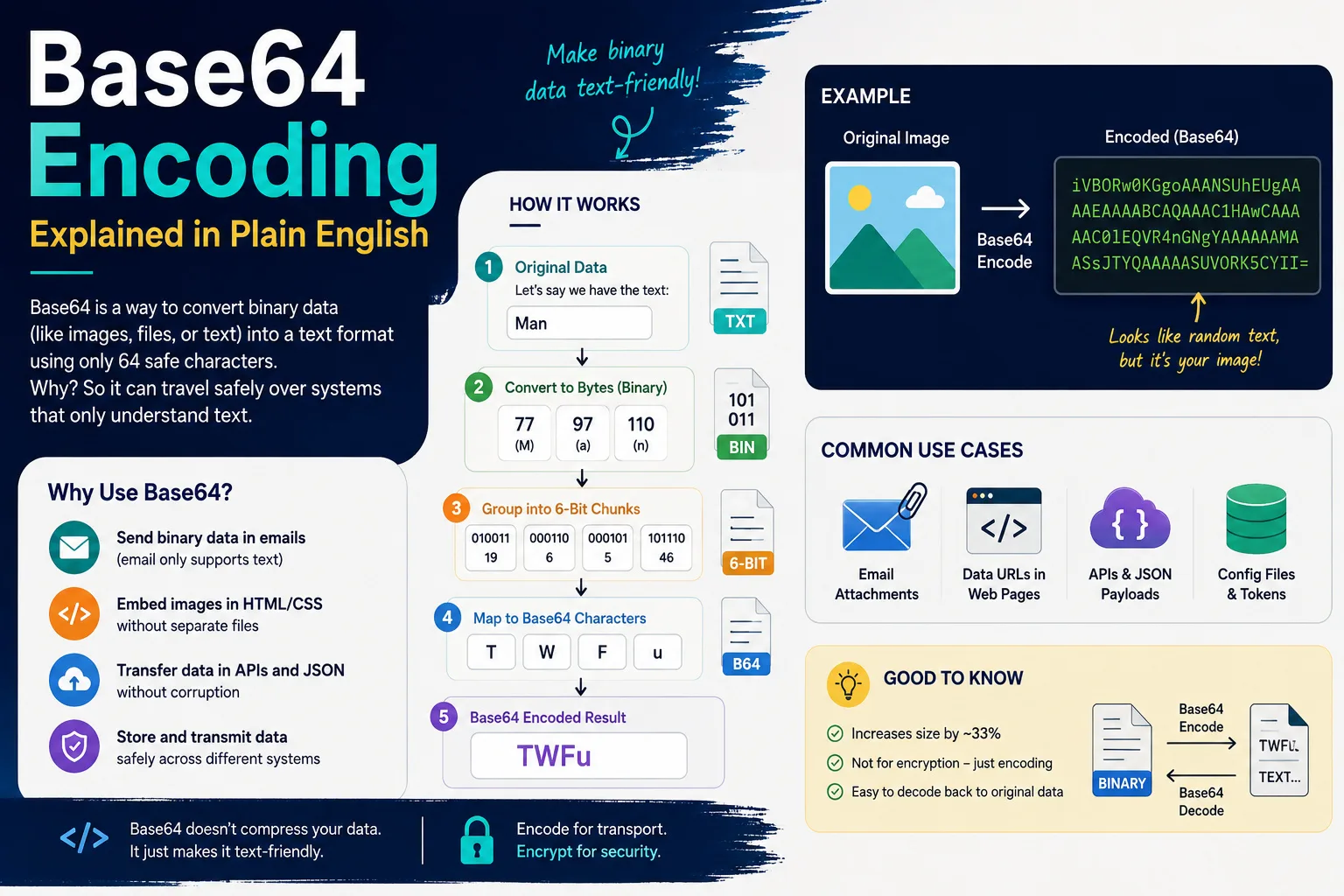
You've met Base64 even if you've never heard of it: the long SGVsbG8gV29ybGQ=-style strings in URLs, the data:image/png;base64,… gibberish in a webpage's source, the middle chunk of every login token. It looks like encryption and isn't, looks like compression and isn't — it's something humbler and more useful: a way to write any data using only characters that every computer system on earth agrees on. Here's the what, why and how, in plain language.
The problem Base64 solves
Much of computing's plumbing was built for plain text: email protocols, URLs, XML and JSON documents, HTML attributes. Binary data — images, files, encrypted blobs, even text in unusual encodings — contains bytes those channels mangle, truncate or reject. Base64 is the diplomatic passport: it re-expresses any bytes using just 64 universally safe characters (A–Z, a–z, 0–9, + and /, with = as padding), so the data can travel through any text-only channel and be perfectly reconstructed on the other side.
How it works: 3 bytes in, 4 characters out
That's the whole trick. Six bits can express 64 values, and 64 characters are available, so every 6-bit slice becomes one printable character. When the input isn't a multiple of 3 bytes, = padding fills out the final group — which is why Base64 strings so often end in one or two equals signs. The cost of the diplomacy: output is ~33% longer than the input (4 characters carry 3 bytes). Base64 makes data safe, never smaller.
Try it: "Hi" becomes "SGk="
H (72) and i (105) are 16 bits — 01001000 01101001. Sliced into 6-bit groups: 010010 (18→S), 000110 (6→G), 1001+padding (36→k), then = to mark the missing byte: SGk=. Decode reverses the walk exactly. Paste anything into our Base64 encoder/decoder to watch both directions — it's UTF-8 safe, so Urdu, Arabic and emoji round-trip perfectly (a courtesy many older tools fail).
Where you meet Base64 daily
- Data URLs:
data:image/png;base64,iVBOR…embeds an entire image inside HTML or CSS as text — small icons often ship this way to save a network request. - JWT login tokens: the
xxxxx.yyyyy.zzzzztokens behind "stay logged in" are three Base64 segments; decode the middle one and you can read your own session's claims (a useful debugging trick — and a reminder that JWTs are readable, not secret). - Email attachments: every file you've ever emailed traveled as Base64 inside the message body — and arrived ~33% larger in transit than on disk.
- Basic authentication: the HTTP
Authorization: Basicheader isusername:passwordin Base64 — encoded, not encrypted, which is exactly why it must only ever ride inside HTTPS. - Config files and APIs: anywhere binary or multi-line data must live inside JSON/XML/YAML without breaking the format.
The security misunderstanding (worth repeating)
Base64 hides nothing. Decoding requires no key and takes microseconds — this page's tool does it as you paste. Treating Base64 as protection ("the password is encoded in the config") is a genuinely common security mistake; anything secret needs real encryption, and anything hashed (like stored passwords) needs proper hashing. Base64's honest job description is transport safety: it guarantees the bytes arrive intact, not that nobody reads them. If you take one sentence from this article, take that one.
When you'll actually use the tool
Decoding a JWT segment to debug a login issue; encoding text with special characters for a config value; reading the source of an email attachment; embedding a small image as a data URL; checking what some suspicious encoded string in a log actually says. Developers do these weekly; power users monthly — and the converter runs entirely in your browser, so tokens and credentials never leave your machine. For the adjacent jobs, the CSV ⇄ JSON converter and case converter complete the text-wrangling toolkit.
Base64's cousins: the encodings you'll meet next
Once Base64 clicks, its relatives stop being mysterious. URL-safe Base64 swaps + and / for - and _ because the originals have jobs in URLs — it's why JWT segments look almost-but-not-quite like standard Base64; some decoders want the characters swapped back. Percent-encoding (%20 for space) is URLs' own escape system for individual characters — different tool, same "make it safe for the channel" mission. Hex encoding writes each byte as two characters (0–9, a–f): twice the size of the data instead of Base64's 1.33×, but human-scannable — which is why hashes and colour codes use it. Unicode/UTF-8 isn't an escape system at all but the character encoding underneath: the reason this page's tool handles Urdu correctly is that it converts text to UTF-8 bytes before Base64 touches anything — the step naive tools skip. The unifying idea across all of them: computers move bytes, channels have rules about which bytes may pass, and encodings are the adapters. Recognise the adapter, and gibberish in a log or config becomes merely data wearing travel clothes — usually one paste into the decoder away from readable.